Evaluating the Travelo Web Template for Modern Business Design
In the competitive landscape of digital presence, selecting the right foundation for a website is a critical decision for businesses and designers alike. The Travelo Web Template has emerged as a notable option for those seeking a structured, visually appealing starting point for their projects. This article provides an objective evaluation of the template, exploring its features, ideal use cases, and potential limitations to help you determine if it aligns with your specific design and development goals.
Understanding the Travelo Web Template
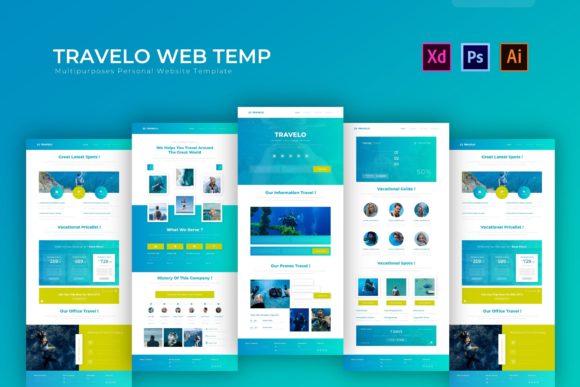
The Travelo Web Template is a comprehensive design kit primarily distributed in PSD (Adobe Photoshop), AI (Adobe Illustrator), and XD (Adobe XD) formats. Unlike ready-to-deploy HTML themes that require immediate coding integration, this template serves as a high-fidelity prototype and design asset. It is engineered to provide a "Clean and Modern Layout" that caters specifically to business needs, though its aesthetic versatility allows it to be adapted for various industries beyond travel.
At its core, the template offers a professional layouting structure where all elements are fully editable. This means that every component, from typography to imagery, can be manipulated within the native Adobe environments. The inclusion of paragraph styles ensures consistency across different sections of the design, while image placeholders allow designers to visualize content placement before final assets are ready. For teams that prioritize design precision and brand customization before moving into the development phase, this approach offers significant control.
Key Features and Technical Capabilities
When evaluating any design resource, understanding the technical specifications is essential. The Travelo Web Template distinguishes itself through several key features that streamline the design workflow:
- Layered Template Structure: Every element is organized into distinct layers within the source files. This organization is crucial for efficiency, allowing designers to isolate specific components like headers, footers, or call-to-action buttons without affecting the rest of the composition.
- Cross-Platform Compatibility: The package includes main files for Adobe Photoshop, Adobe Illustrator, and Adobe XD. This flexibility ensures that regardless of your preferred tool in the Adobe ecosystem, you can access and modify the design without compatibility issues.
- Built-in Free Fonts: To reduce licensing complications and setup time, the template utilizes free fonts. This allows for immediate editing and rendering without the need to purchase additional typefaces or manage complex font installations.
- Stylish and Modern Aesthetic: The visual language of the template leans towards contemporary design trends, utilizing ample whitespace, clear typography hierarchies, and balanced grid systems to create a professional appearance.
Ideal Use Cases for This Template
The Travelo Web Template is not a one-size-fits-all solution; rather, it excels in specific scenarios. It is particularly well-suited for design agencies and freelance designers who need to present mockups to clients before writing a single line of code. Because the files are fully editable in Photoshop and Illustrator, designers can rapidly iterate on color schemes and layout adjustments based on client feedback.
Furthermore, it is a strong fit for businesses undergoing a rebrand. If a company already has a development team but lacks in-house design resources, this template provides a robust framework. The team can take the layered PSD or XD files, input their specific content, adjust the colors to match brand guidelines, and hand off a precise specification to developers. The "Readme" file included in the package typically assists in navigating these files, ensuring a smoother transition from design to development.
Additionally, for educational purposes or portfolio building, this template serves as an excellent study material. Aspiring UI/UX designers can deconstruct the layered files to understand how professional layouts are constructed, how paragraph styles are managed, and how to organize complex design systems.
Considerations and Potential Tradeoffs
While the benefits of the Travelo Web Template are clear, there are important considerations to keep in mind before selection. The primary tradeoff is the requirement for design software proficiency. Since this is a PSD/AI/XD template and not a pre-coded WordPress theme or HTML boilerplate, the end-user must possess skills in Adobe Creative Cloud applications. If your goal is to launch a website immediately without a design phase, this template will require an extra step of conversion into code.
Another factor to consider is the development timeline. Using a design template adds a dedicated design phase to your project lifecycle. You must allocate time for customizing the layout, replacing placeholders, and exporting assets before development can begin. For projects with extremely tight deadlines where speed to market is the only priority, a coded theme might be more efficient.
Additionally, while the template includes built-in free fonts, users should verify that these typefaces align perfectly with their long-term brand identity. Sometimes, the "free" constraint may limit typographic expression compared to a custom font licensing budget.
Making the Decision: Is Travelo Right for You?
Deciding whether to utilize the Travelo Web Template depends largely on your workflow and resource availability. If you value design fidelity and customization, and you have access to Adobe tools, this template offers a high return on investment. It eliminates the need to start from a blank canvas, providing a polished, modern foundation that can be tailored extensively.
However, if you are a non-technical business owner looking for a "drag-and-drop" solution to get a site live today, this may not be the immediate fit unless you plan to hire a designer to implement it. In such cases, the template serves better as a reference for what you want your site to look like rather than the tool you will use directly.
Ultimately, the Travelo Web Template represents a bridge between conceptualization and execution. It empowers users to define the visual narrative of their business with precision. By offering a clean, modern layout with fully editable elements, it supports a professional design process that prioritizes quality and brand alignment. Whether you are presenting a new concept to the world or refining an existing digital presence, understanding the capabilities and requirements of this template is the first step toward a successful web project.