Bringing Hand-Painted Charm to Digital Projects with a Watercolor Vector Squares Set
There is a specific kind of visual warmth that digital design often struggles to replicate. We live in an era of crisp lines, perfect gradients, and pixel-perfect symmetry, yet audiences still crave the organic imperfection of human touch. This is where a Watercolor Vector Squares Set becomes an invaluable asset for creators who need to bridge the gap between professional polish and artistic soul. Unlike standard geometric shapes that feel cold and industrial, these painted design elements offer texture, depth, and a handcrafted aesthetic that immediately makes a project feel more approachable and authentic.
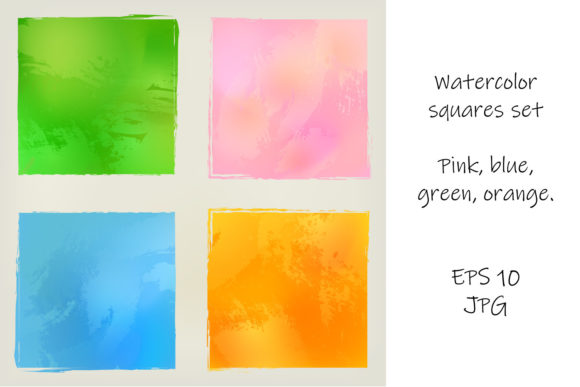
When you download a high-quality set featuring pink, blue, green, and orange hues, you aren't just getting clipart; you are acquiring a versatile toolkit for storytelling. The beauty of these resources lies in their dual nature. They possess the fluid, bleeding edges of traditional watercolor painting, capturing the way pigment pools and dries on paper, but they are built as vector graphics. This means you can scale a tiny square icon up to the size of a billboard without losing a single drop of detail or encountering jagged pixels. For anyone working across different media—from a small mobile app icon to a large format trade show banner—this scalability is non-negotiable.
Real-World Applications for Marketers and Small Business Owners
Consider the everyday challenges faced by small business owners and marketers. You often need to produce high-volume content quickly, but you also need to stand out in a crowded feed. A generic stock photo of a handshake or a laptop rarely stops the scroll anymore. However, using watercolor illustration for web assets can change the entire tone of your brand communication. Imagine a local bakery launching a new spring menu. Instead of a sterile list of items, they use soft pink and orange watercolor squares as background frames for their pastry photos on Instagram. The result feels inviting and sweet, mirroring the product itself.
For entrepreneurs creating brochures or flyers, these elements serve as excellent structural tools. You might use the blue and green squares to create a modular layout for a service menu. Because the edges are painted and irregular, they break up the rigid grid of a standard document, guiding the reader's eye naturally from one section to another. It adds a layer of sophistication without requiring custom illustration skills. When a potential client picks up a flyer that feels handmade, they subconsciously associate that care and attention to detail with the quality of your service.
Elevating Typography and Editorial Design
Editors and publishers know that whitespace is valuable, but empty space can sometimes feel barren. In magazine layouts or blog headers, a Watercolor Vector Squares Set acts as a subtle anchor for typography. Placing a bold headline over a washed-out orange square creates immediate contrast and focus. The texture of the watercolor interacts with the font, making the text feel like it belongs to the image rather than just sitting on top of it.
This is particularly effective for lifestyle magazines or independent zines that focus on wellness, travel, or creativity. The organic shapes complement articles about mindfulness or nature far better than sharp, digital rectangles. If you are designing a poster for a community yoga event, using soft green and blue painted squares can evoke a sense of calm and balance before the viewer even reads the date and time. The color psychology here is powerful; the specific palette of pink, blue, green, and orange covers a wide emotional spectrum, from energetic and playful to serene and trustworthy.
Practical Benefits for Educators and Content Creators
The utility of these assets extends well beyond commercial advertising. Educators and online course creators frequently look for ways to make learning materials less intimidating. A dense PDF workbook can feel overwhelming to a student. By inserting watercolor squares as bullet points, section dividers, or background highlights for key terms, the material becomes visually digestible. It signals that the content is friendly and accessible.
Similarly, bloggers and social media influencers who rely on visual consistency can use these sets to create a recognizable brand identity. If you consistently use the same shade of watercolor blue in your story highlights or post templates, your audience begins to recognize your content instantly. Since these files usually come in EPS 10 format, they are compatible with almost all major design software, including Adobe Illustrator, CorelDRAW, and even some free alternatives. This ensures that whether you are a tech-savvy freelancer or a hobbyist just starting with design, you can integrate these elements into your workflow without a steep learning curve.
What to Consider Before You Download
While the aesthetic appeal is obvious, there are practical factors to weigh before adding a new resource to your library. First, consider the file formats. A robust set should include both EPS 10 and high-resolution JPG versions. The EPS file allows you to edit the colors if your brand guidelines require a specific hex code rather than the default pink or orange provided. You might want to shift a green square to match your company logo exactly. The JPGs are perfect for quick drag-and-drop usage in platforms like Canva or PowerPoint where vector editing isn't possible.
Secondly, think about the resolution and transparency. High-quality watercolor illustrations rely on the nuance of the paint strokes. Ensure the images have transparent backgrounds so you can layer them over colored papers or photographs without a white box appearing around the edges. This flexibility is crucial for creating composite images or textured overlays. Also, verify the licensing terms. Most sets intended for commercial use will allow you to incorporate them into client work, such as a brochure for a paying customer, but it is always wise to double-check if there are restrictions on selling the raw files themselves.
From Digital Screens to Print Media
One of the most common pitfalls in design is creating something that looks great on a monitor but fails in print. Watercolor textures can sometimes lose their subtlety if the resolution is too low or the color mode is incorrect. However, because these are vector-based, the transition from screen to paper is seamless. Whether you are printing a limited run of art prints, a corporate annual report, or a wedding invitation suite, the integrity of the brushstrokes remains intact.
For wedding planners and stationers, this is a game-changer. The trend toward botanical and organic wedding themes pairs perfectly with watercolor squares. They can be used as frames for save-the-date cards, patterns for envelope liners, or decorative elements on the menu cards. The ability to mix and match the pink, blue, green, and orange elements allows for customization that fits any season or color scheme. A summer wedding might lean heavily on the oranges and greens, while a winter celebration could utilize the cool blues and soft pinks to evoke a frosty yet warm atmosphere.
Ultimately, integrating a Watercolor Vector Squares Set into your design process is about efficiency meeting artistry. It saves you the hours it would take to paint these elements yourself while giving you the freedom to manipulate them endlessly. It allows freelancers to deliver premium-looking results to clients who might not have the budget for custom hand-painted illustrations. It enables hobbyists to create professional-grade invitations for family events. And it helps marketers cut through the noise of digital perfection with something that feels genuinely human. In a world saturated with synthetic visuals, the imperfect, flowing edge of a watercolor square reminds us that there is still room for art in our everyday communications.